Search for Applicants not in any folders
You can find the list of applications for a position that are not in any folders in two ways.
Here's how:
The first way is by using the Search Form.
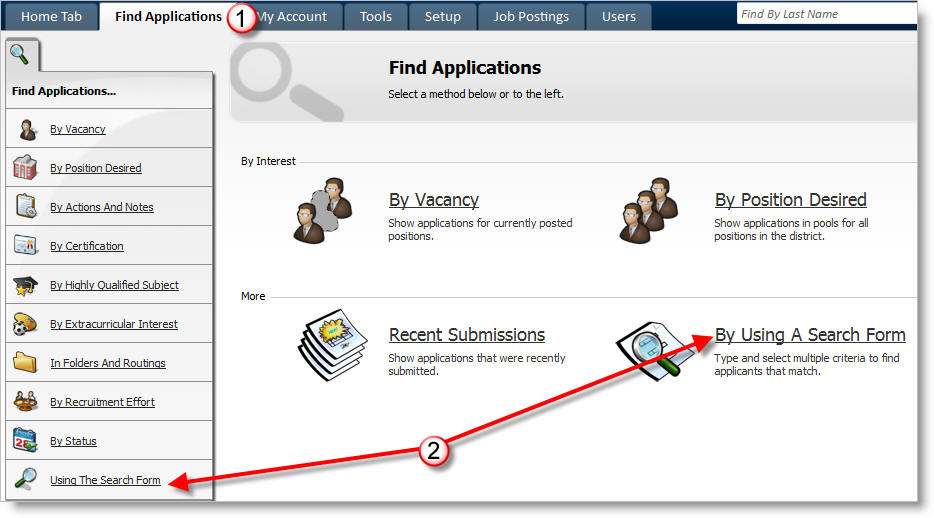
1) Click on the Find Applications tab.
2) Click on Using the Search Form.
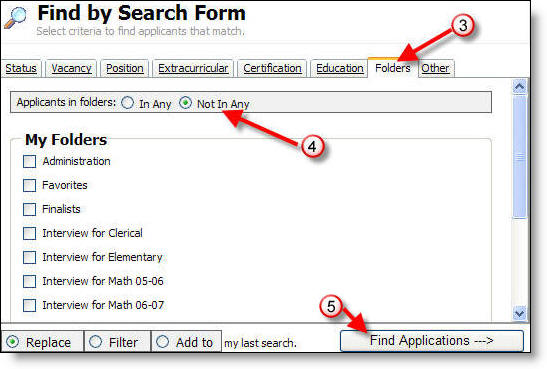
3) Click on the Folders tab.
4) Click on the Not in Any button.
5) Click the on Find Applications.
You can also find the applications that are not in any folders from a list of previously selected applicants. In the following example we have selected a list of applications for Substitute Teachers.
1) After selecting a list of applicants, click on the Filter Applicants link.

2) Click on the In Folders link.
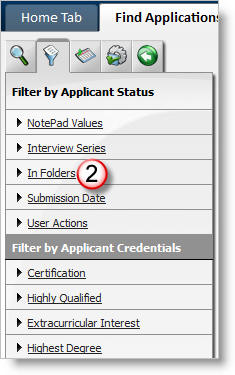
3) Click the Not in any folder link to receive a list of applicants for the selected position that are not in any folder--in this case, any of the Substitute Teacher applications not in any folders.

More Information: